
Ctrl+K
tomwer  documentation - Home tomwer  documentation - Home
2.0
  • Tutorials
  • User Guide
  • API Reference
  • Canvas
  • Development
  • Other Applications
  • youtube
  • pypi
  • gitlab
  • Tutorials
  • User Guide
  • API Reference
  • Canvas
  • Development
  • Other Applications
  • youtube
  • pypi
  • gitlab

Section Navigation

  • Installation
  • tomwer 2.0 highlights
  • Glossary
  • Tomotools Trainings
  • Recommended Way to Use (ESRF) SLURM Cluster
  • Troubleshooting
  • Python Scripts
    • Copying a NXtomo
    • Search for NXtomo(s), Modify, and Resume Processing
    • Filter Scans with Failed Processes
    • Holo-Tomo Normalize Reconstructed Slices
    • Load a Volume as a Python NumPy Array
    • Modify Some EDF Metadata
    • Overwrite rotation angles
    • Remove reconstructed volumes
    • Saving Reconstruction(s) Under a Different Name
    • Select a GPU
    • Create a Text File with CoR Values
    • Define Default Directory for Qt (Input) Dialog
    • Create a folders with symbolic links to all cast volumes
    • Clear existing reduced frames
  • Publish Processed Data to the Data Portal
  • Scan / Process Supervision - Advancements
  • User Input(s) Formatting and Keywords
  • Multi-entry (NXtomo) File
  • OpenGL backend
  • Providing / Searching a List of Scans
  • User Guide
  • Python Scripts
  • Create a folders with symbolic links to all cast volumes

Create a folders with symbolic links to all cast volumes#

In the following script we create a folder containing symbolic links to all casted volumes
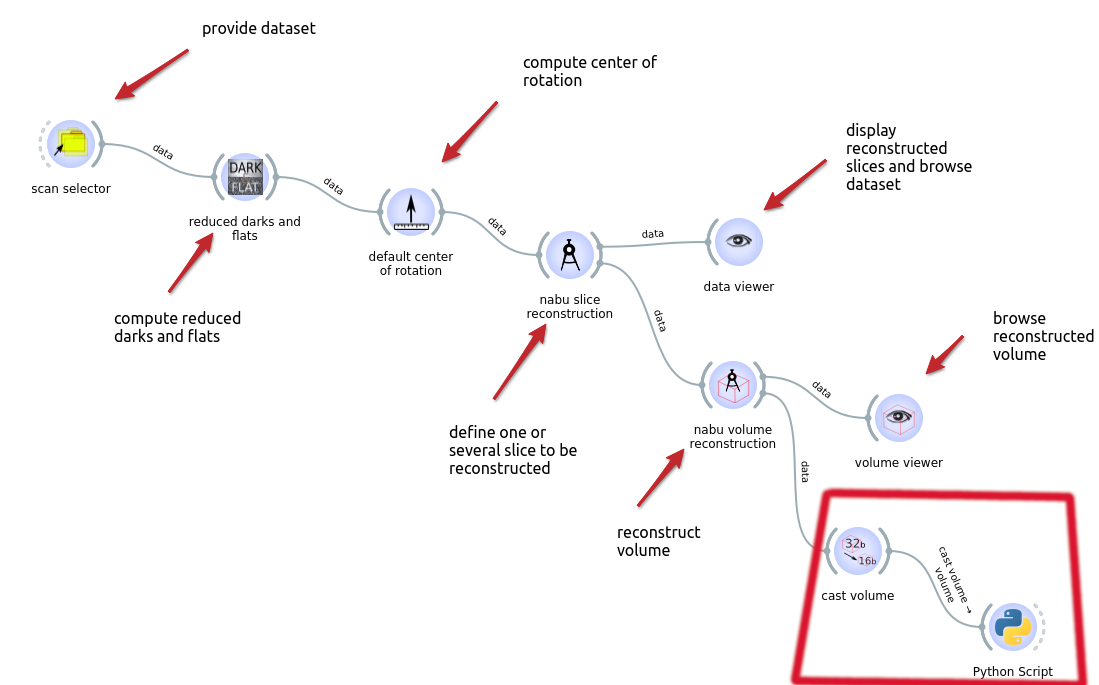
../../_images/workflow3.png

Warning

this is the ‘cast volume’ output that must be connected to the Python script ‘volume’ input.

Script#

import os
from tomoscan.esrf.volume.singleframebase import VolumeSingleFrameBase

output_dir = "/path/to/folder" # root folder of the symbolic links

if in_volume is not None:
    link_src = in_volume.data_url.file_path()

    link_dst = os.path.join(
        output_dir,
        in_volume.get_identifier().scheme, # optional: if you want to store your data with under output_dir/j2k, hdf5... Can be useful if you have more than one output data type
        os.path.basename(link_src),
    )
    target_is_directory = isinstance(in_volume, VolumeSingleFrameBase)
    os.makedirs(os.path.dirname(link_dst), exist_ok=True)

    os.symlink(link_src, link_dst, target_is_directory=target_is_directory)

previous

Define Default Directory for Qt (Input) Dialog

next

Clear existing reduced frames

On this page
  • Script

© Copyright 2016-2025, ESRF.

Created using Sphinx 9.1.0.

Built with the PyData Sphinx Theme 0.18.0.